


Weather Forecast - Live Radar
0.00.00 Reviews
App Specs
- Version
- 26.2.1
- Updated On
- License
- Free
- Downloads
- 10,000+
- Developer
- Freshness
- Categories
- Weather
- Platform
- Android
Screenshots
 Analysis by AppCompare
I tend to check the weather at the point when it can still change my plans: before a commute, a walk, or an errand that would be miserable in heavy rain. Weather Forecast - Live Radar is built around that practical habit. Its most distinctive draw is the radar view, which can make changing conditions easier to judge than a single temperature reading. I would treat it as a useful planning aid, though, not as a guarantee that every shower will arrive exactly when the screen suggests.
Why the radar matters
A standard forecast answers broad questions such as whether the day looks wet or warm. A radar view is useful for a different reason: it helps you look at precipitation in relation to your location and decide whether to leave now, wait, or take a different route. That shift from a general outlook to a visual, near-term check is the feature I would reach for most often.
It is particularly helpful when the weather is unsettled. If the sky is grey but dry, a quick look can add context before you set off. If rain is already nearby, the map may help you decide whether an outdoor plan is still sensible. I would not read a radar image as a precise countdown, however. Weather moves and changes, and a visual estimate should support common sense rather than replace it.
Using it for ordinary plans
For a normal weekday, I would check the forecast once while getting ready and look at the radar again just before heading out if the weather seems changeable. That second check is more useful than repeatedly reopening the app every few minutes: it gives me a chance to adjust a small decision, such as carrying an umbrella or moving a walk to another part of the day, without turning weather checking into a chore.
A realistic example is an afternoon errand on foot. The daily outlook may look manageable, but the radar can help me judge whether a band of rain appears to be approaching the area. If it does, I can take a coat, combine errands, or postpone the walk. The benefit is not that the app makes the choice for me; it gives me another piece of information at the moment the choice matters.
For a longer outdoor plan, I would use the radar alongside the broader forecast rather than relying on the map alone. A hike, sports session, or family outing needs more than a glance at nearby precipitation. Checking the general outlook first and then using radar for the immediate picture is a more balanced workflow than treating one screen as the whole forecast.
Where it fits among weather apps
Compared with a basic phone weather screen, a live radar view gives me a more visual way to assess changing conditions. The usual built-in app may be enough if I only want today’s temperature and a simple chance of rain. This app makes more sense when I care about where precipitation is relative to my plans and want to inspect conditions rather than read only a short summary.
Worth Reading Before You Choose

Flipboard Shows What News Apps Must Do Beyond the Feed

Switching to Android Auto Means Rethinking Your Driving Routine

Google Calendar Makes a Crowded Week Easier to Manage

Ludo King Makes the Most of the Minutes Between Plans

Baby Panda World Brings Quick Play to Modern Phones, but Its Game Library Feels Busy

ESPN’s Live Game View Makes Following Close Games Easier
It is also different from a specialist weather tool that people may use for detailed forecasting or professional decisions. I would not choose this app as a substitute for official emergency guidance or a source designed for technical meteorology. For everyday decisions, the simpler approach can be an advantage; for high-stakes work or severe conditions, I would check authoritative local alerts as well.
The app is a free weather app from Freshness, with in-app purchases listed from $2.99 to $16.99 per item. That makes it reasonable to try without paying upfront, but I would look carefully at any purchase prompt and decide whether the added value suits my habits before spending. The core reason to install it should be the way its weather information helps you plan, not an assumption that every optional extra is essential.
Small choices that make checking more useful
One practical tip is to use the radar to answer a specific question instead of browsing it without a plan. “Do I need to change my departure time?” is more useful than trying to interpret every patch of color. A focused check keeps the map from becoming distracting and helps you combine what you see with the forecast and the actual conditions outside.
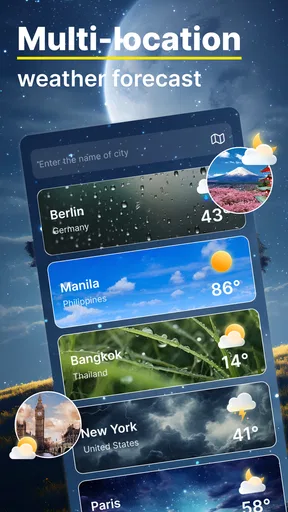
If you regularly travel between places, compare the forecast for the destination with the weather where you are before leaving. That avoids the common mistake of dressing for the conditions at home when the other end of the trip may be different. The app’s multiple-location support is handy for this kind of routine, although switching locations still requires you to remember to check the right one.
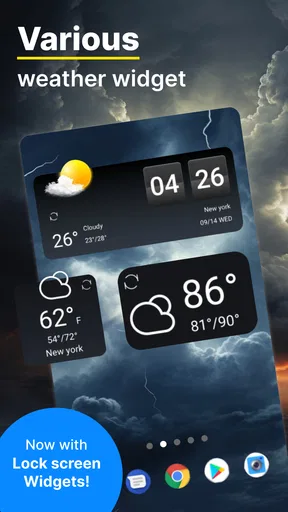
Widgets can also reduce friction if you like seeing a quick weather snapshot on your home screen. I would use one as a prompt to check conditions, not as a replacement for opening the app when the radar is the deciding factor. A compact glance is convenient, but it may not give you the spatial detail that makes the map useful.
There is a trade-off between quick access and attention. Weather tools can encourage repeated checking, especially when the day looks uncertain. I find it more sensible to check at natural decision points—before leaving, before an outdoor activity, or when conditions noticeably change—rather than treating every refresh as meaningful. That approach makes the app more useful without letting it dictate the day.
Who is likely to get the most from it
I would recommend trying it if you often walk, cycle, commute, or plan outdoor errands and want a visual way to think about nearby rain. It can also suit someone who keeps an eye on weather in more than one place, since saved locations reduce the need to search from scratch each time. The simple day-to-day purpose is its strength: it helps turn weather information into a practical decision.
On the other hand, if you only check the temperature once in the morning, your phone’s built-in forecast may already do enough. If you need detailed specialist forecasts, dependable operational guidance, or emergency instructions, a general consumer app should not be your only source. I would also skip paying for optional items until you have used the free experience long enough to know what you actually need.
What to expect before installing
The app is rated for Everyone and has an average rating of 0.0, while its install count is over 10,000. Those figures are context, not proof that the forecast will match every local situation. Weather accuracy can vary with location and conditions, so I would judge the app by whether its information is helpful for my own routine rather than by treating popularity or a rating as a guarantee.
It was released on June 1, 2024, and its current version is 26.2.1. It requires Android 10 or later. If you are deciding whether it will suit an older device, checking the operating system first is the simplest way to avoid an unnecessary install attempt. The app’s free starting point makes trying it straightforward, while the optional purchases are worth considering only if they correspond to something you genuinely use.
First Impressions: Easy Peasy Setup
Setting up Weather Forecast - Live Radar is a breeze. You download it, open it up, and boom—you're greeted with a clean and intuitive interface. The developers really nailed the user experience here. It’s not cluttered like some apps I've tried before. Everything is laid out in a way that just makes sense, even if you're not a tech wizard.
One thing that caught my eye was how fast it loads the weather data. I mean, nobody wants to wait around just to see if they need a jacket, right? Plus, it automatically detects your location, which saves you the hassle of manually entering your city. Pretty neat!
The Features: More Than Just Temperature
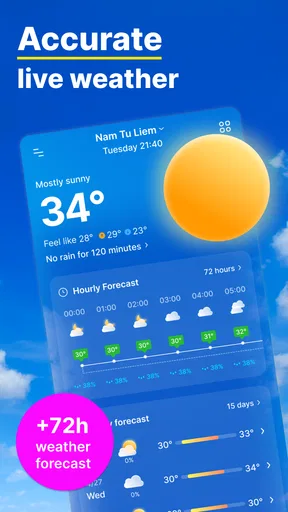
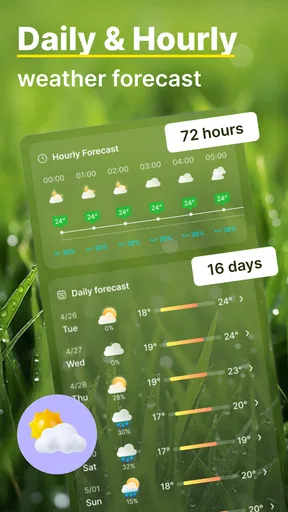
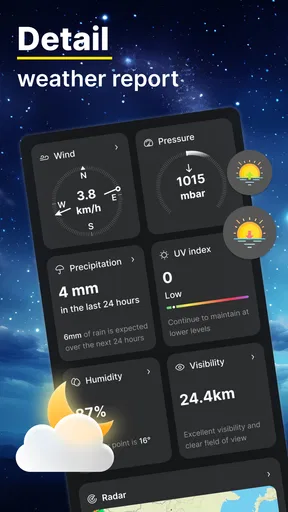
Okay, let’s dive into the features because there are a ton. Obviously, you get the basic info like current temperature, humidity, and wind speed. But it goes way beyond that. The app provides a detailed hourly forecast, which is super handy if you’re planning your day.
What really stands out is the live radar. It's like watching a weather channel but on your phone. The radar is super detailed and updates in real-time, so you can see exactly where that rain cloud is headed. It's perfect for us who like to plan every outdoor activity down to the last detail.
Another cool feature is the severe weather alerts. It gives you a heads-up if there’s something nasty coming your way. It’s like having a personal meteorologist warning you to stay indoors.
User Experience: Smooth Sailing
Using the app is a smooth experience. The navigation is straightforward with everything accessible from the main screen. You can easily switch between daily and weekly forecasts. Also, the graphics are pretty slick. The use of colors and icons makes it visually appealing without being overwhelming.
I also appreciate the customizable widgets. You can place them on your home screen, so you get a quick peek at the weather without even opening the app. It's all about convenience, folks!
Little Extras: Going the Extra Mile
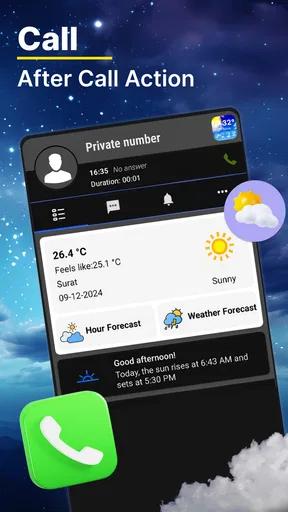
I love that the app includes some thoughtful extras. For instance, it has a sunrise and sunset tracker. It’s a small detail, but for those who love catching that golden hour, it’s a nifty feature.
Also, the app supports multiple languages, which is a win for non-English speakers. And if you’re someone who travels often, you can track weather for multiple locations. Just add your favorite cities, and switch between them with a tap.
Final Thoughts: Worth the Download?
So, is Weather Forecast - Live Radar worth downloading? In my opinion, absolutely. It’s packed with features, super easy to use, and reliable. Whether you’re planning a picnic, a hike, or just your daily commute, having accurate weather info at your fingertips is a game-changer.
In a world where weather can be unpredictable, this app provides a little peace of mind. So go ahead, give it a try, and let me know what you think. Happy weather watching!
Pros
- Accurate real-time weather updates.
- User-friendly interface and navigation.
- Customizable alerts for severe weather.
- High-resolution radar imagery.
- Supports multiple locations tracking.
Cons
- Frequent ads can be intrusive.
- Some features require in-app purchases.
- Occasional delays in data updates.
- Battery consumption is relatively high.
- Limited offline functionality.
FAQs for Weather Forecast - Live Radar
How accurate is Weather Forecast - Live Radar?
Weather Forecast - Live Radar is known for its high level of accuracy, utilizing advanced meteorological data and real-time updates to provide precise weather conditions. However, like all weather apps, predictions can vary due to unexpected weather changes. Users generally find it reliable for planning daily activities.
Does the app provide alerts for severe weather conditions?
Yes, Weather Forecast - Live Radar offers real-time alerts for severe weather conditions such as thunderstorms, hurricanes, and tornadoes. These alerts are customizable, allowing users to receive notifications based on their specific location and preferences, ensuring safety and preparedness.
Is Weather Forecast - Live Radar free to use?
The app offers a free version with basic features, including daily weather updates and forecasts. For more advanced features like ad-free usage, extended forecasts, and premium radar views, users can opt for a subscription model, which provides enhanced functionalities and a more comprehensive experience.
Can I use the app to track weather in multiple locations?
Absolutely! Weather Forecast - Live Radar allows users to add and monitor weather conditions in multiple locations. This feature is particularly useful for users who travel frequently or wish to keep track of weather conditions in different cities where family or friends reside.
How user-friendly is the interface of Weather Forecast - Live Radar?
The app boasts a user-friendly interface designed to be intuitive and easy to navigate. It includes clear icons, easy-to-read graphics, and customizable settings that cater to both novice users and weather enthusiasts, making it accessible and enjoyable for all levels of users.


